Stateless ZIP library - SLZ
| Branch | name | Last version | Released | Links | Notes |
|---|
| Development | master | 1.4-dev5 | 2026-11-08 | git / web / github | may be broken |
| 1.3 | stable-1.3 | 1.3.2 | 2026-10-25 | git / web / github | Stable version |
| 1.2 | stable-1.2 | 1.2.2 | 2026-04-09 | git / web / github | Previous stable version |
Introduction
SLZ is a fast and
memory-less stream compressor which produces an output that
can be
decompressed with zlib, gzip or any browser. Since version 1.3 it also
comes with
uslz, a lightweight decompressor working with a 32 kB sliding
buffer, but zlib remains perfectly fine for decompression when its memory usage
is not a concern.
The purpose is to use SLZ in situations where a
zlib-compatible stream is
needed and zlib's resource usage would be too high while the compression ratio
is not critical. The typical use case is in
HTTP servers and gateways which
have to compress many streams in parallel with little CPU resources to assign
to this task, and without having to thottle the compression ratio due to the
memory usage. In such an environment, the server's
memory usage can easily be divided by
10 and the CPU usage by 3 or more. In addition its high performance made it fill a gap in
network backup applications.
How does it work ?
While
zlib uses 256 kB of memory per stream in addition to a few tens of bytes
for the stream descriptor itself,
SLZ only stores a stream descriptor made of
40 bytes on 64-bit machines (32 bytes on 32-bit ones). Thus it is particularly
suited to environments having to deal with tens to hundreds of thousands of
concurrent streams.
The key difference between zlib and SLZ is that
SLZ is stateless in that it
doesn't consider the data previously compressed as part of its dictionary. It
doesn't hurt compression performance when it is fed in large enough chunks (at
least a few kB at once), but it
must not be used if it has to read less than
a few kB at a time, or the caller will have to implement the
input buffer to
maximize the compression ratio. For example, an HTTP gateway may defragment all
the parts from a chunked-encoded response buffer into a linear buffer that is
then fed at once to SLZ. This temporary buffer would then be static and shared
between all streams running on the same thread.
A side effect from its stateless nature is that it can emit a zlib-compatible
stream
without being vulnerable to CRIME-like attacks by processing the
sensitive and attacker-controlled data in distinct batches. Since
no dictionary
persists between calls, there is no risk that attacker-controlled data is used
to guess sensitive data using dictionary lookups.
Another induced benefit which was not initially seeked is that
SLZ is about 5
times as fast as zlib in its fastest mode. This is the result of the
simpler matching and encoding mechanisms involved which permit even more
optimisations.
Since version 1.4, four
compression levels are available. Level 1 is the
fastest one and gives up early on hard-to-compress areas. Level 2 is the default:
it gives up just as early but keeps checking the areas it skips, and stops
skipping as soon as it recognizes something. Level 3 searches more before giving
up. Level 4 never gives up and extends matches further backwards, for a slightly
better ratio. In addition, a
text content
type may be selected for HTML, CSS, JS, JSON, SVG and similar contents: instead
of the fixed huffman tree from RFC1951, it uses a tree trained on web contents,
which saves about 15% of the huffman-coded bits on such contents. It is not
suited to binary contents.
Reference tests
Some performance tests were run using version 1.0 on various types of data showing anything between
227 MB/s and 753 MB/s per core on the older hardware depending on the difficulty
to find matching strings and on the amount of data emitted as literals (hence not
compressed). In the end, comparative tests were performed using some
reference
datasets that are already being used for other libraries. This performance
report was produced using the
Silesia Corpus to get something comparable to
what is reported by the LZ4 utility here :
https://github.com/Cyan4973/lz4.
Since then, tests have been performed on modern hardware, from 16-core ARM to
64-core AMD EPYC, and performance on x86_64 and ARMv8 has been further improved.
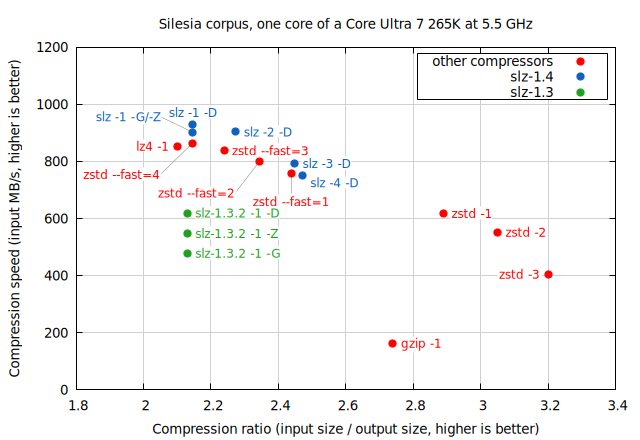
The following tests were run on a single core of an
Intel Core Ultra 7 265K
at 5.5 GHz (turbo mode). The figures for lz4, zstd, gzip and slz were all measured
on the same machine. The input file is the Silesia Corpus tar file placed in a
RAM disk (211947520 bytes). The output size was measured using "wc -c", but the
bandwidth was measured by sending the output to /dev/null so as not to let the
"wc" command slow everything down.
| Product | Input BW | Compression ratio | Notes |
|---|
| lz4-1.8.2 -1 | 828 MB/s | 2.10 | lz4 -1zc (fastest) |
| lz4-1.8.2 -2 | 828 MB/s | 2.10 | lz4 -2zc (exact same output as -1) |
| zstd-1.5.7 --fast | 694 MB/s | 2.44 | zstd at fastest compression |
| zstd-1.5.7 -1 | 617 MB/s | 2.89 | zstd -c1 |
| zstd-1.5.7 -2 | 552 MB/s | 3.05 | zstd -c2 |
| zstd-1.5.7 -3 | 405 MB/s | 3.20 | zstd -c3 |
| slz-1.4 -1 -D | 939 MB/s | 2.15 | zenc in deflate format, level 1 (fastest) |
| slz-1.4 -1 -G | 908 MB/s | 2.15 | zenc in gzip format, level 1 (fastest) |
| slz-1.4 -1 -Z | 908 MB/s | 2.15 | zenc in zlib format, level 1 (fastest) |
| slz-1.4 -2 -D | 830 MB/s | 2.30 | zenc in deflate format, level 2 (default) |
| slz-1.4 -3 -D | 795 MB/s | 2.32 | zenc in deflate format, level 3 |
| slz-1.4 -4 -D | 746 MB/s | 2.32 | zenc in deflate format, level 4 (best) |
| slz-1.4 -T -D | 742 MB/s | 2.40 | zenc in deflate format, text content type |
| slz-1.3.2 -1 -D | 619 MB/s | 2.13 | zenc in deflate format, level 1 |
| slz-1.3.2 -1 -G | 478 MB/s | 2.13 | zenc in gzip format, level 1 |
| slz-1.3.2 -1 -Z | 547 MB/s | 2.13 | zenc in zlib format, level 1 |
| gzip-1.14 -1 | 163 MB/s | 2.74 | gzip level 1 (fastest) |
SLZ was included in Inikep's
lzbench benchmark
suite, which compares a wide range of compression tools. The project maintains an updated
performance table where other solutions can be compared.
Only gzip/zlib and SLZ can emit a stream that a regular zlib-compatible browser
can decompress (RFC1950/1951/1952 aka zlib, deflate, gzip). Here
SLZ is 4.5 to
5.7 times faster than zlib, for a payload 14 to 27% larger than zlib's. Slz 1.4's
gzip compression is
1.9 times faster than slz-1.3's, its zlib compression 1.66
times faster, and its deflate compression 52% faster, all while compressing
slightly more.
What is particularly surprising is to see
slz-1.4's levels 1 and 2 both being
faster and stronger than lz4 on this machine. This partly comes from the
optimization level, as a generic build (which matches the build of the distro's
package) shows 924 and 811 MB/s respectively: then only level 1 is faster, and
level 2 is slightly slower, though both still compress better. Compared to
zstd, slz is not put to shame either: zstd always compresses better and is
always slower, at all levels. The closest pair is zstd --fast and slz -T, at
compression ratios of 2.44 and 2.40 (2% better for zstd), where slz is 6.9%
faster. Again, we are flirting with CPU-specific optimizations here.
The text content type was trained on web contents and Silesia does not match
them, but it still brings the output within 14% of zlib's, because the corpus
contains some source code, which is text not very different from web contents.
The three output formats now run at almost the same speed: the
zlib and gzip
formats cost only 3.5% compared to raw deflate on this CPU.
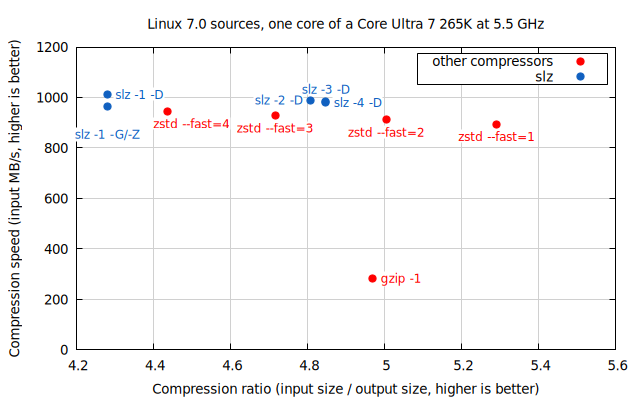
Compressing the sources of a
Linux 7.0 kernel better illustrates the gains to
expect from text inputs, on the same machine:
| Product | Input BW | Compression ratio | Notes |
|---|
| zstd-1.5.7 --fast | 879 MB/s | 5.29 | zstd --fast |
| zenc -1 -D | 1052 MB/s | 4.28 | slz in deflate format, level 1 (fastest) |
| zenc -2 -D | 1046 MB/s | 4.28 | slz in deflate format, level 2 (default) |
| zenc -T -D | 994 MB/s | 4.85 | slz in deflate format, text content type |
| gzip-1.14 -1 | 284 MB/s | 4.97 | gzip level 1 (fastest) |
This is
more than one gigabyte per second of input data that is divided in size
by 4 to 5. It is
3.7 times faster than gzip for a 16% larger output at level 1,
and still
3.5 times faster than gzip for a 2.4% larger output in text mode.
Here again slz completes the spectrum on the fast but lower compression side,
just after zstd: at its highest compression ratio, it is 13% faster than zstd
--fast for a 9% larger output.
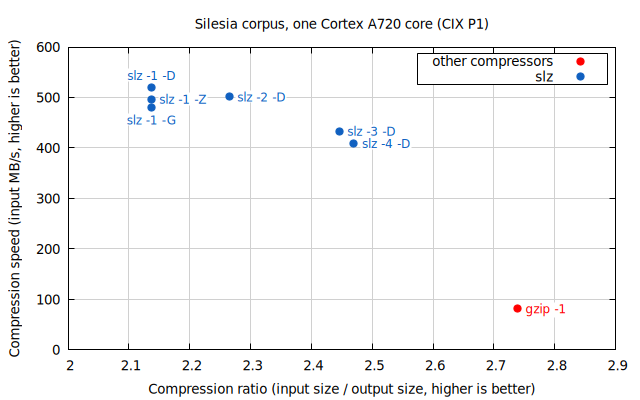
Modern ARM cores deliver good performance as well, as seen below on an A720
core of a CIX P1 processor in a Radxa Orion O6, on the Silesia corpus file:
| Parameters | Output size / input size | Speed (MB/s) |
|---|
| zenc -G -1 | 0.4680 (1/2.14) | 505.7 |
| zenc -Z -1 | 0.4680 (1/2.14) | 529.5 |
| zenc -D -1 | 0.4680 (1/2.14) | 548.0 |
| zenc -D -2 | 0.4362 (1/2.29) | 485.1 |
| zenc -D -3 | 0.4326 (1/2.31) | 467.7 |
| zenc -D -4 | 0.4315 (1/2.32) | 438.4 |
| zenc -D -T | 0.4167 (1/2.40) | 423.0 |
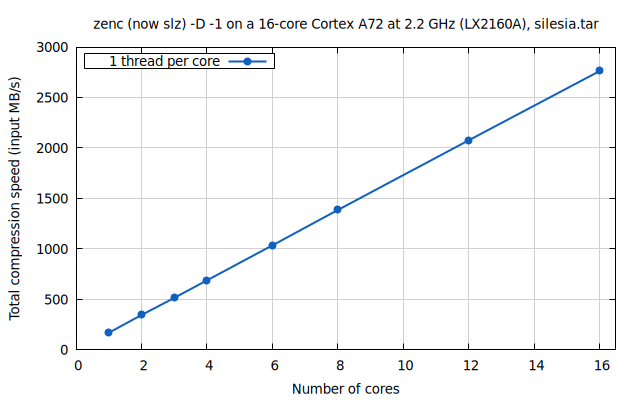
Since SLZ focuses a lot on performance savings gained by
keeping most of the
workload in CPU cache, it
scales very well when multiple cores are used in
parallel (low memory bandwidth) as shown in this tests run on a 16-core ARM
Cortex A72 (NXP LX2160A) running at 2.2 GHz, using the same input data at
level 1 in deflate format :
| #Cores | Input size | BW/core(MB/s) | Total BW(MB/s) |
|---|
| 1 | 211947520 | 169.4 | 169.4 |
| 2 | 211947520 | 172.6 | 345.2 |
| 3 | 211947520 | 171.6 | 514.8 |
| 4 | 211947520 | 172.2 | 688.8 |
| 6 | 211947520 | 172.6 | 1035.6 |
| 8 | 211947520 | 173.3 | 1386.4 |
| 12 | 211947520 | 173.1 | 2077.2 |
| 16 | 211947520 | 172.7 | 2763.2 |
Here the scaling is perfectly linear: each core compresses as fast with all 16
cores busy as when it runs alone. At level 3, the same machine processes
141.7 MB/s on one core and 2328 MB/s on 16 cores.
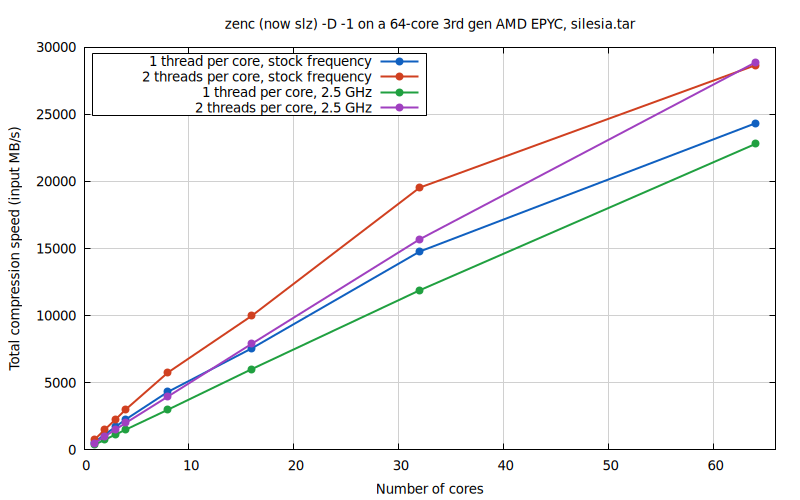
On a more powerful machine (64-core 3rd gen AMD EPYC at 3.7 GHz), with the same settings,
we observe this:
| One thread per core | Two threads per core |
|---|
| #Cores | Input size | BW/core(MB/s) | Total BW(MB/s) |
|---|
| 1 | 211947520 | 573.8 | 573.8 |
| 2 | 211947520 | 574.9 | 1149.8 |
| 3 | 211947520 | 572.4 | 1717.2 |
| 4 | 211947520 | 569.4 | 2277.6 |
| 8 | 211947520 | 540.1 | 4320.8 |
| 16 | 211947520 | 472.7 | 7563.2 |
| 32 | 211947520 | 461.6 | 14771.2 |
| 64 | 211947520 | 380.0 | 24320.0 |
|
| #Cores | Input size | BW/core(MB/s) | Total BW(MB/s) |
|---|
| 1 | 2*211947520 | 757.0 | 757.0 |
| 2 | 2*211947520 | 762.6 | 1523.2 |
| 3 | 2*211947520 | 754.0 | 2262.0 |
| 4 | 2*211947520 | 756.2 | 3024.8 |
| 8 | 2*211947520 | 720.0 | 5760.0 |
| 16 | 2*211947520 | 624.4 | 9990.4 |
| 32 | 2*211947520 | 610.4 | 19532.8 |
| 64 | 2*211947520 | 447.6 | 28646.4 |
|
The per-core drop seen here is not caused by SLZ but by the CPU's frequency,
which falls as more cores become active: it runs at 3.7 GHz on up to 4 cores,
3.1 GHz from 8 to 32 cores, and about 2.5 GHz on all 64 cores. With the
frequency fixed at 2.5 GHz, the scaling is almost linear again, with each core
retaining 94% of its single-core performance with all 64 cores busy, and
running two threads per core brings 27 to 33% more:
| One thread per core, 2.5 GHz | Two threads per core, 2.5 GHz |
|---|
| #Cores | Input size | BW/core(MB/s) | Total BW(MB/s) |
|---|
| 1 | 211947520 | 380.4 | 380.4 |
| 2 | 211947520 | 380.6 | 761.2 |
| 3 | 211947520 | 379.0 | 1137.0 |
| 4 | 211947520 | 378.9 | 1515.6 |
| 8 | 211947520 | 374.0 | 2992.0 |
| 16 | 211947520 | 376.1 | 6017.6 |
| 32 | 211947520 | 371.4 | 11885.1 |
| 64 | 211947520 | 356.0 | 22783.4 |
|
| #Cores | Input size | BW/core(MB/s) | Total BW(MB/s) |
|---|
| 1 | 2*211947520 | 506.3 | 506.3 |
| 2 | 2*211947520 | 507.2 | 1014.3 |
| 3 | 2*211947520 | 505.0 | 1515.0 |
| 4 | 2*211947520 | 504.2 | 2016.8 |
| 8 | 2*211947520 | 496.5 | 3971.8 |
| 16 | 2*211947520 | 494.1 | 7906.1 |
| 32 | 2*211947520 | 490.1 | 15684.0 |
| 64 | 2*211947520 | 450.9 | 28855.6 |
|
With all 128 threads busy, the machine compresses the equivalent of about
230 Gbps
of input TCP traffic to 107 Gbps of output TCP traffic at level 1. At level 3,
which compresses better (ratio 2.32 instead of 2.15), it still processes
26.0 GB/s, or 208 Gbps of input traffic compressed to 89.7 Gbps, and a single
core runs at 491 MB/s (650 MB/s with two threads).
Decompression is not SLZ's main purpose, but the
zdec utility, based on the
built-in uslz decompressor, is
3 times faster than zcat on streams produced
by zenc, and remains 2 times faster on streams produced by gzip. These tests
were run on a single core of a 3rd gen AMD EPYC at 3.7 GHz, decompressing the
Silesia corpus compressed in gzip format (the output size is the 211947520 bytes
of the original data):
| Stream produced by | Decompressor | Time(s) | Output BW(MB/s) |
|---|
| zenc -G -1 | zdec (slz-1.4-dev5) | 0.364 | 582 |
| zenc -G -1 | zcat (gzip-1.12) | 1.076 | 196 |
| zenc -G -T | zdec (slz-1.4-dev5) | 0.570 | 372 |
| zenc -G -T | zcat (gzip-1.12) | 1.090 | 191 |
| gzip -1 | zdec (slz-1.4-dev5) | 0.567 | 374 |
| gzip -1 | zcat (gzip-1.12) | 1.114 | 190 |
Increasing compression ratio in HTTP gateways
Note: the measurements in this section were performed with version 1.2
and will need to be performed again with the current version.
Since some products
automatically throttle the compression level based on the
CPU usage or the available memory, on high speed networks, zlib can end up
showing a much lower average compression ratio in order to fill an uplink. With
SLZ,
no extra memory usage is needed for compression, and the
CPU usage is
reduced by 2.5-3.5 times, meaning that the
throttling will happen at much higher data
rates. The net effect is a
significant improvement on the compression ratio
compared to zlib at a given resource usage.
HAProxy running on a single core of a core i5-3320M, with 500 concurrent users,
the default 16kB buffers, and accessing
www.haproxy.org (76 kB) shows the
following measures with traffic leaving the machine via a gigabit Ethernet link
(hence the 976 Mbps of IP traffic) after being compressed with zlib and SLZ,
respectively :
At 100% CPU (no CPU usage limit) :
| Library | BW In | BW Out | BW Saved | Ratio | memory VSZ/RSS | hits/s |
|---|
| zlib | 480 Mbps | 188 Mbps | 292 Mbps | 2.55 | 130M / 101M | 744 |
| slz | 1700 Mbps | 810 Mbps | 890 Mbps | 2.10 | 23.7M / 9.7M | 2382 |
At 85% CPU (limited) :
| Library | BW In | BW Out | BW Saved | Ratio | memory VSZ/RSS | hits/s |
|---|
| zlib | 1240 Mbps | 976 Mbps | 264 Mbps | 1.27 | 130M / 100M | 1738 |
| slz | 1600 Mbps | 976 Mbps | 624 Mbps | 1.64 | 23.7M / 9.7M | 2210 |
In the CPU-limited test, once CPU usage limit was reached,
blocks were sent
uncompressed. This explains how the gigabit link was always saturated, and
it
is then the input bandwidth which varies according to the average compression
ratio. In all situations,
SLZ resulted in bandwidth savings 3 times higher than
zlib.
No magics inside!
There are 6 key points having a large impact on compression speed in any LZ-
based compressor :
dictionary lookup : looking up a sequence of bytes in a recent window is not
necessarily fast. SLZ uses a hash-based technique similar to LZO or LZ4,
focusing on keeping track of only the most recent occurrence of a given
sequence. The hash table contains the absolute position in the stream of the
last occurrence of the hashed entry. This table is initialized to impossible
values prior to compressing so that unused entries are not even evaluated, as
it was found to be faster than not initializing them. During tests, it was
found that hashing 4 bytes to one value among 4096-65536 resulted in the best
compression ratio, and that 8192 entries was the best tradeoff between speed
and compression ratio. Smaller hash tables cause more collisions hurting the
compression ratio, and larger ones experience a significant slowdown on
certain datasets due to the hashtable having more difficulties to fit
entirely in the CPU cache. The size remains configurable at build time
using SLZ_HASH_BITS.
indexing : if sequences of less than 3 bytes are considered for a lookup,
since we only keep the last occurrence, there's a high risk of not keeping
the most useful sequence which has large chances of matching a similar word.
For example in HTML a lot of occurrences of "><", "</", "/>" can be found so
the probability that the one from "</a>" is picked instead of the one from
"</td>" will make it hard to find long matches. Conversely, sequences larger
than 4 bytes will only match once in a while and will prevent shorter series
of characters from being matched. Experimentation has shown that hashing 3
bytes only provided the same compression ratio as hashing 4 bytes, with up to
10% faster input processing thanks to the reduced cost of hashing. Indexing
all the repeated data caused a significant performance drop (about 5%) for
less than 1% compression ratio improvement, so only the beginning of each
match is indexed. When a match is found, SLZ also checks whether it extends
backwards into the pending literals, which recovers bytes that were missed
without having to index more.
longest match : the longest match measurement is very similar to an strcmp()
call except that we count similar characters. In order to avoid this slow
operation most of the time, we store in the hash table a copy of the 4 bytes
that were hashed. This makes it easy to perform a comparison and to skip
those which do not match, then to only start the longest match measurement
for parts which already match on the first 4 bytes. With a 13-bits hash on
32-bit character sequence, there's a theorical 1 chance over 524288 that a
matching hash implies a matching sequence. But in practice on selected text
this chance is significantly higher since not all 32 bits are used, it's more
like 24 bits (6 bits per char), so it's one chance over 2048 that an entry
will match. That's still 2047/2048 useless calls to the memmatch function
that are saved this way. The match itself is then measured one machine word
at a time, the first differing byte being located by counting the trailing
zeroes of the XOR of the two words.
encoding the output : deflate is often criticized for its bit-oriented stream
which is expensive to manipulate as it requires bit shifts. Moreover, on top
of this the deflate stream supports several encoding modes, the most common
one being dynamic huffman trees, which requires some significant maintenance
to keep a valid tree up to date and which SLZ doesn't use. Instead, SLZ uses
static huffman trees, and when too many binary entries are found to keep this
encoding efficient, it switches to the plain literal mode. Proceeding like
this comes with a significant benefit : all code sequences, all distances and
all lengths are stored as their respective huffman output bits. This avoids
an encoding phase, sequences of bits are immediately sent to the destination
buffer without any further operation, and remain reasonably cheap compared to
the more common usages. On 64-bit machines, the bits are accumulated in a
machine word and a whole match (length and distance) is written with a single
unaligned store. Long runs of literals that do not match anything are skipped
and sent as plain literals without being looked up (at levels 1 to 3). The
text content type uses the same principle with a precomputed tree trained on
web contents. It is declared as a dynamic tree in the stream, so that any
decoder accepts it, but it never changes, and is still used through its
precomputed output bits.
checksumming : 3 checksum methods exist depending on the encoding format.
RFC1951 (raw deflate) doesn't involve any checksum. RFC1952 (gzip) uses a
CRC-32 which is somewhat expensive but can be optimized in various ways.
On x86 CPUs with the carry-less multiplication instruction (PCLMULQDQ),
detected at boot time, SLZ computes it by folding 16 bytes at a time, which
makes it almost free. On ARMv8, the CPU's CRC-32 instructions are used when
available. Other
machines use pre-computed tables processing 4 bytes at a time. RFC1950 (zlib
format) uses an Adler-32 checksum which theorically involves modulus (divide)
but which can be optimized as it's done with a number very close to a power
of two. This format matters more than it seems, because it is what browsers
call "deflate". Its two sums form a long dependency chain which is hard to
speed up, but on machines with SIMD units (SSE2 on x86, NEON on ARM),
SLZ splits the input into 32-byte blocks and sums each byte offset of the
blocks independently. This is written in plain C that the compiler
vectorizes, and made the zlib format 12 to 23% faster depending on the CPU.
It is now about as fast as gzip on x86 and faster than gzip on ARM. The
checksum is computed over all the input at once before compressing, which
also contributes to preloading the input data into the caches.
implementation-specific optimizations : modern CPUs can load unaligned words
from memory with minimal to no overhead. On architectures that support this
(ix86, x86_64, armv7, armv8), this is used to limit the number of operations
and memory accesses, both to compare data and to write the output. The bit
reversal needed by deflate's huffman codes uses the dedicated instruction on
ARM. Some CPUs have a smaller cache and the direct mapping between distances
and huffman sequences can make it thrash a lot. Some experimentations were
made using a direct mapping only for shortest distances (the most common
ones), but results were not encouraging for now as a cache miss is not
completely offset by the amount of extra operations.
These three factors have a significant impact on the compression ratio :
collisions in the dictionary, caused by suboptimal hash distribution. Here
with 8k entries we have what looks like the best tradeoff between speed and
compression ratio for most workloads tested, and it can easily be changed
using a macro. This impact is dampened a bit by the backward lookup upon a
match, based on the estimate that if a collision happens on the first byte,
it will not necessarily happen on the next one, so that a match of 5 bytes or
more can still be found.
output encoding : the dynamic huffman trees would definitely shorten the
output stream but at an important performance cost. But even with fixed trees
it is possible to waste a lot of space. First, input bytes 144 to 255 are
encoded on 9 bits per byte. SLZ constantly monitors the output stream to
decide when it's preferable to switch to plain literals which cost exactly
52 bits to switch back and forth and will not inflate the output stream any
further. Second, referencing a match can be longer than the data it replaces.
This is true for short sequences, but it can be true even for a long sequence
in the middle of a series of plain literals. By monitoring the output stream
and verifying the encoding cost before switching, it is possible to bound
the overhead for non-compressible data to the base 5 bytes per 64 kB plus
the headers and less than 50 bytes per call (published as
SLZ_MAX_OVERHEAD() in slz.h). The text tree costs about 80 bytes each
time a block is opened, so a block is only opened once the savings are known
to repay it.
content type : most of the contents compressed by HTTP servers and gateways
is text (HTML, CSS, JS, JSON, SVG...), on which zlib's default fixed huffman
tree is far from optimal, as it encodes most letters on 8 bits and match
lengths on 7 bits or more. Since 1.4, an application knowing that it
compresses such contents can call slz_set_content_type(strm, SLZ_CT_TEXT)
after initializing the stream. Instead of the fixed tree, SLZ then uses a
static tree that was trained on web contents, declared at the beginning of
each block in about 80 bytes. It remains as cheap to use as the fixed one, at
the expense of a few percent of speed, and shrinks the output of such
contents by 12 to 18%. It is not suited to binary contents nor to contents of
less than 1-2 kB.
Get it!
SLZ is provided as a library with a few extra tools (eg:
zenc, a compressor
emitting the various formats, and
zdec, a decompressor based on uslz
which can decompress any gzip, zlib or raw deflate stream, not only those produced
by SLZ, and detects the gzip and zlib formats by itself; see the reference tests
above for its performance). It is distributed under the
X11 license, meaning that
you can do a lot of things with it, such as merge it into
GPL or BSD-licensed programs,
as well as use it in proprietary software.
Contributions are welcome and should be
sent as
Git patches (see
"git format-patch") and will be made under
the same license exclusively.
Implementations
HAProxy can use SLZ since version 1.6.0 to compress HTTP responses.
External links